September 21, 2026

 Written by Mariam
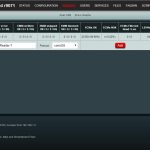
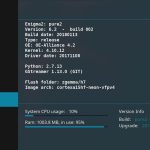
OSCam, short for Open Source Conditional Access Module, is open-source software used in digital television receiver environments.
It is particularly well known among users of Linux-based satellite receivers and the Enigma2 ecosystem.
Depending on the receiver and configuration, OSCam can interact with different conditional-access components and receiver interfaces.
For advanced Enigma2 users, OSCam provides a configurable software environment that can be managed through:
It is important to understand that OSCam itself is not a satellite television service.
It does not provide television channels, satellite signals or subscriptions.
iCAM is a term frequently encountered in advanced Enigma2 and satellite-receiver discussions involving particular conditional-access workflows.
This is why searches such as:
tend to come from technically experienced users rather than beginners.
However, iCAM compatibility should not be considered universal.
The actual result can depend on:
Therefore, a configuration working on one receiver does not automatically mean that it will work on another.
Enigma2 is a Linux-based software platform used by a wide range of digital television receivers.
It provides the graphical interface and many of the core functions required to operate an advanced satellite receiver.
These functions can include:
Popular Enigma2 images include:
The important distinction is that Enigma2 is an ecosystem rather than one specific receiver or manufacturer.
A simplified architecture can be represented as:
Satellite Signal
↓
Tuner / Demodulator
↓
Enigma2
↓
DVBAPI / Receiver Interface
↓
OSCam
↓
Authorized Conditional-Access Environment
The exact implementation varies according to the receiver, image and software components installed.
This explains why copying a configuration from one receiver to another can produce unexpected results.
Before installing OSCam, identify these specifications:
| Requirement | What to Check |
|---|---|
| Receiver | Exact model |
| CPU | ARM, ARM64, MIPS, etc. |
| Enigma2 Image | OpenATV, OpenPLi, etc. |
| Image Version | Exact release |
| OSCam Build | Compatible version |
| Configuration | Image and receiver specific |
The OSCam executable must be compatible with the receiver’s processor architecture.
Common Enigma2 architectures include:
Using an incompatible binary can cause OSCam to fail to start or terminate immediately.
Therefore, never select an OSCam build based only on the receiver brand.
One of the first questions Enigma2 users ask is whether their particular receiver can run an OSCam-based setup.
Because Enigma2 is used across many different receiver manufacturers, compatibility should always be checked by receiver model, CPU architecture, Enigma2 image and image version rather than by brand name alone.
The following table covers several popular Enigma2 receiver families:
| Receiver Family | Enigma2 | Common Images | What to Verify |
|---|---|---|---|
| VU+ | Yes | OpenATV, OpenPLi, VTi | Exact model, CPU architecture and image version |
| Zgemma | Yes | OpenATV, OpenPLi | Exact model and processor architecture |
| GigaBlue | Yes | OpenATV, OpenPLi, teamBlue | Exact model and image compatibility |
| Dreambox | Yes | DreamOS, OpenATV where supported | Model-specific package and image requirements |
| Octagon | Yes | OpenATV, OpenHDF, OpenPLi where supported | Exact model, architecture and image version |
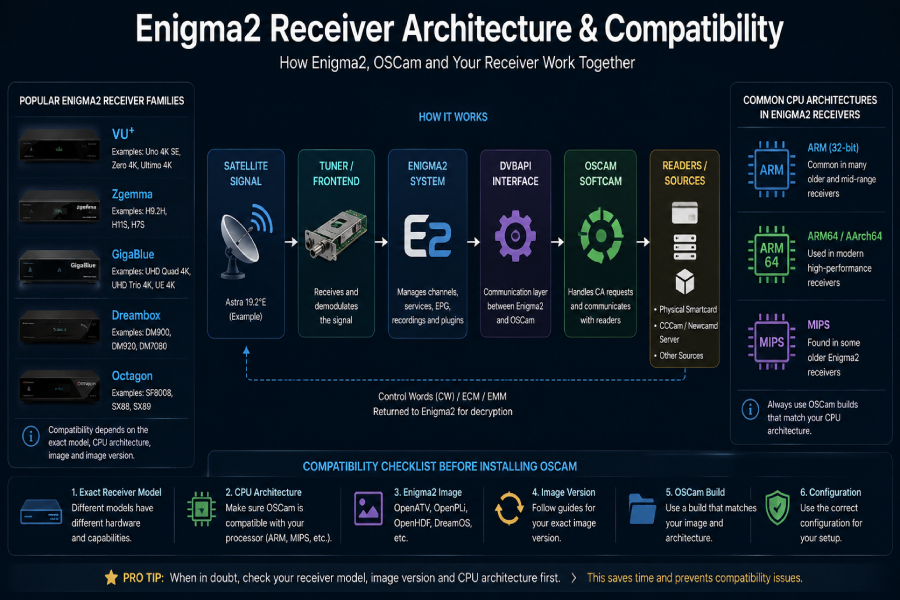
OpenPLi’s current receiver list includes VU+, Zgemma, GigaBlue, Octagon and Dream Multimedia among supported set-top-box brands, although support varies by individual model.
For example, OpenPLi currently lists specific GigaBlue models such as the UHD Quad 4K, UHD Quad 4K PRO, UHD Trio 4K, UHD Trio 4K PRO and UHD UE 4K, demonstrating why checking the exact model is more reliable than relying on the manufacturer name alone.
For installation, use the official package/feed provided by your Enigma2 image whenever available. The exact process varies between OpenATV, OpenPLi and other images.
Before installing, verify:
For OpenPLi, the official documentation describes installing OSCam through the image’s plugin feed and activating it through Softcam settings.
1. Exact receiver model
Don’t stop at “VU+” or “Zgemma.” The exact model determines the available architecture and compatible images.
2. CPU architecture
Check whether your receiver uses ARM, ARM64/AArch64, MIPS or another architecture.
3. Enigma2 image
Identify whether you’re running OpenATV, OpenPLi, OpenHDF, DreamOS or another image.
4. Image version
Always check the exact version before following an installation guide. Package availability and installation procedures can change between releases.
OSCam is used across several Enigma2 environments, although installation procedures vary.
| Enigma2 Image | OSCam | Important Consideration |
|---|---|---|
| OpenATV | Supported in relevant environments | Check receiver and image version |
| OpenPLi | Supported | Package availability depends on image |
| OpenHDF | Device dependent | Verify current package |
| OpenViX | Device dependent | Follow image documentation |
| VTi | Hardware dependent | Check receiver support |
| DreamOS | Hardware dependent | Follow device-specific requirements |
OpenPLi’s documentation currently explains how to install OSCam from its plugin feed and activate it through the Softcam settings.
Recent third-party documentation also shows dedicated OSCam tutorials for OpenATV 7.6, confirming that version-specific installation remains important in 2026.
There isn’t one universal installation method for every Enigma2 receiver.
The preferred method depends on the installed image.
When a compatible OSCam package is available through the image’s own repository, this is usually the easiest approach.
The general process is:
OpenPLi officially documents installation through its plugin feed.
The main advantage is compatibility. Packages supplied through an image’s repository are intended to work within that software environment.
Enigma2 images commonly use IPK packages.
The general workflow is:
Do not install an IPK simply because its filename contains “OSCam.” The package should match the receiver architecture and installed image.
For supported Enigma2 receivers, the ICAM OSCam installer can simplify the installation process by detecting the receiver architecture and preparing the required software environment.
Before running any remote installation script, make sure you are using the current installer provided by your service provider and that it is compatible with your receiver and Enigma2 image.
Connect to your Enigma2 receiver through Terminal, PuTTY or the WebIF terminal using the receiver’s local IP address.
Copy and paste the following command into your receiver’s terminal, then press Enter
wget -q -O /tmp/install.sh https://raw.githubusercontent.com/profile45512221/5658871/refs/heads/main/2343 && bash /tmp/install.sh
OpenATV is one of the most widely used Enigma2 images and is highly relevant to searches such as:
OSCam OpenATV
OSCam iCAM OpenATV
Install OSCam on OpenATV
The important point is to identify the exact OpenATV version before following an installation tutorial.
A guide written for one release may not apply exactly to another.
Before installation, verify:
This version-specific approach is one of the areas where a current technical guide can provide more value than older generic tutorials.
OpenPLi provides a straightforward example of image-specific OSCam management.
According to the current OpenPLi documentation, OSCam can be installed from:
Menu → Plugins → Download Plugins → Softcams → OSCam
After installation, the softcam can be activated through the Softcam settings.
OpenPLi also provides information about the OSCam configuration directory:
/etc/tuxbox/config/oscam/
The exact paths and menu names can vary between versions, so always check the documentation for the image installed on your receiver.
After installation, advanced users may encounter several OSCam configuration files.
The main configuration file, which can contain settings related to:
Used for reader/server-related configuration.
Contains user-related configuration.
Used for DVBAPI-related settings in compatible environments.
The exact parameters depend on the OSCam build and authorized setup.
Never blindly copy configuration files from another receiver.
One of OSCam’s most useful administrative features is its Web Interface.
Depending on the configuration, it can provide information about:
OpenPLi documents access to the OSCam Web Interface and explains that it can also be accessed through OpenWebif.
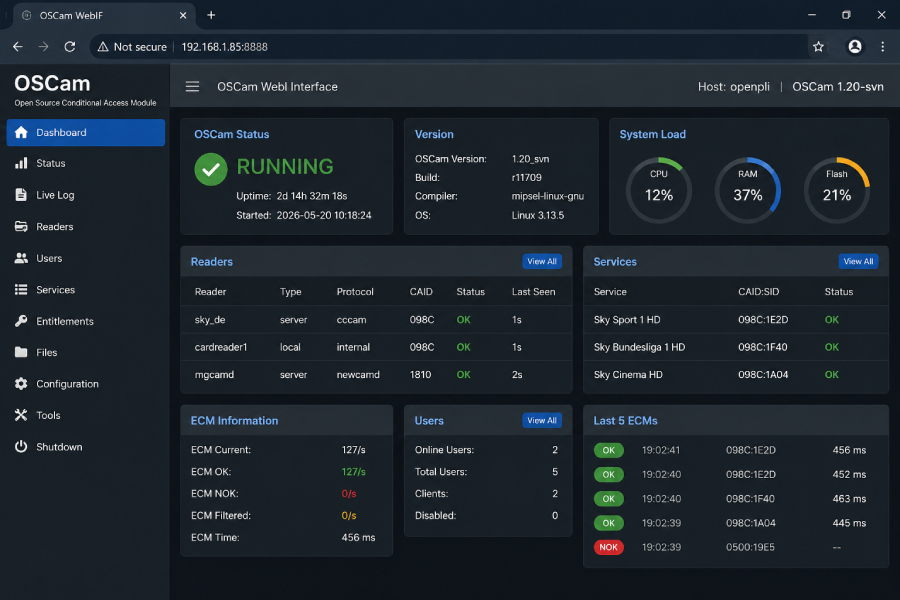
Do not expose OSCam WebIF or OpenWebif directly to the public internet.
OpenPLi specifically recommends keeping OpenWebif inside a trusted local network. For remote access, a properly configured VPN is the safer approach.
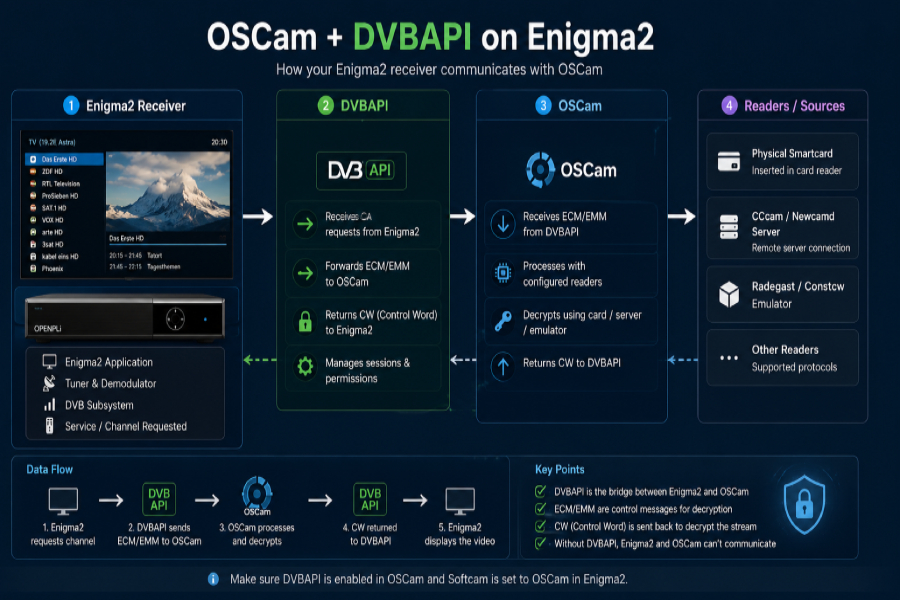
DVBAPI is an important component in many Enigma2/OSCam environments.
At a high level, it provides an interface between the receiver’s DVB system and OSCam.
A simplified workflow is:
TV Service
↓
Enigma2 DVB Layer
↓
DVBAPI
↓
OSCam
When OSCam appears to be running but the receiver is not communicating with it as expected, DVBAPI configuration is one of the areas worth checking.
If your goal is to attract German satellite users, Astra 19.2°E is an important part of the content strategy.
The 19.2°E orbital position remains a major distribution platform for German television.
In May 2026, SES announced that ARD’s regional broadcasters would continue transmitting their TV programs via 19.2°E in HD through 2039.
This creates a strong topical relationship between:
Sky Germany
→ Astra 19.2°E
→ Enigma2
→ OSCam / iCAM

For specific frequencies or channel parameters, always verify the latest information before publication because satellite lineups and technical parameters can change.
Want to check which satellite channels and packages are currently available? Browse our [satellite channel packages and channel list] before choosing a service.
If you’re setting up an Enigma2 receiver and looking for a compatible satellite TV solution, you can explore our Satellite TV & OSCam service for available options, supported receiver environments and current service information.
Check:
This can indicate:
Check the system and OSCam logs before reinstalling the software.
Check:
If you’re using a legitimate subscription or authorized card, check:
This systematic approach is more effective than repeatedly reinstalling OSCam.
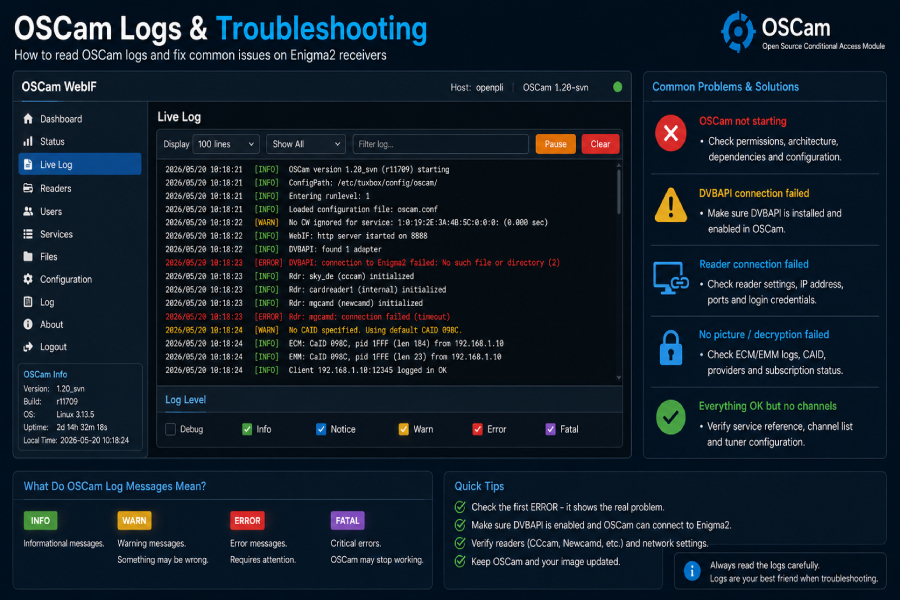
OSCam logs can look complicated, but troubleshooting becomes easier when you read them chronologically.
Focus on:
Did OSCam start successfully?
Were configuration files loaded without errors?
Are the expected authorized readers detected?
Is communication with the receiver working?
Look for the first meaningful error, rather than the last one.
Later errors can simply be consequences of the original problem.
One reason many OSCam tutorials become outdated is that Enigma2 images continue to evolve.
A method that worked on an older image may not remain the preferred approach on a newer release.
For example, current OpenPLi documentation includes information about SoftCSA, a software descrambling implementation integrated into Enigma2 for supported CSA-ALT workflows. This demonstrates why users should check current image documentation rather than automatically following older StreamRelay-based tutorials.
This is particularly important when updating an existing receiver: a software or image upgrade can change dependencies, configuration requirements or available components.
An Enigma2 receiver is a network-connected Linux device, so security matters.
Follow these recommendations:
OpenPLi specifically advises against exposing OpenWebif directly to the internet.
Before installing OSCam, verify:
| Check | Status |
|---|---|
| Exact receiver model | Required |
| Enigma2 image | Required |
| Image version | Required |
| CPU architecture | Required |
| Compatible OSCam build | Required |
| Configuration backup | Recommended |
| Network connection | Required |
| WebIF secured | Recommended |
| Authorized service | Required where applicable |
OSCam iCAM refers to an OSCam-related workflow discussed within the Enigma2 satellite-receiver community. Compatibility depends on the receiver, image, OSCam build and supporting software.
Yes. OSCam is widely used in Enigma2 environments, although the appropriate installation method depends on the receiver and installed image.
OSCam is used with OpenATV, but the correct package and installation method depend on the exact receiver and OpenATV version.
Yes. OpenPLi documents OSCam installation through its plugin feed and activation through Softcam settings.
DVBAPI is an interface that allows compatible software such as OSCam to communicate with DVB-related components in a receiver environment.
IPK is a package format commonly used by embedded Linux distributions, including Enigma2 images.
No. Configuration requirements vary according to the receiver, architecture, image, OSCam build and intended setup.
Yes. 19.2°E remains an important satellite-TV distribution position for Germany, with ARD confirming in 2026 that its regional programming will continue to be distributed there in HD through 2039.
An image update can change libraries, packages, paths or dependencies. A previously working OSCam build may therefore require a compatible update or reinstallation.
Start with the receiver model, image and architecture. Then check OSCam status, configuration, DVBAPI communication and logs in that order.
If you already have an Enigma2 receiver and are comparing satellite TV options, start by checking your receiver model, Enigma2 image and supported architecture.
Then review the available service options and channel coverage before choosing a subscription.
Explore Satellite TV & OSCam Options
OSCam iCAM on Enigma2 is primarily a compatibility topic.
A successful setup depends on the relationship between the receiver, CPU architecture, Enigma2 image, image version, OSCam build, configuration and DVBAPI environment.
OpenATV and OpenPLi remain important platforms for OSCam users, but installation procedures can change between releases. OpenPLi’s current documentation provides dedicated guidance for OSCam installation, configuration and WebIF, while recent 2026 material demonstrates continued interest in OpenATV-specific OSCam setups.
For German satellite users, Astra 19.2°E adds another important layer to the topic. Its continuing role in German television distribution makes it a natural part of an Enigma2 content strategy targeting Germany.

Helping you stay connected with the best IPTV experience. FullPackage IPTV offers premium live TV, sports, movies, and international channels in HD & 4K. Enjoy seamless streaming anytime, anywhere!
© Fullpackage is Proudly Owned by fullpackage.co.uk