September 21, 2026

 Written by Mariam
Looking for a DreamOS Enigma2 download for your Dreambox receiver? Choosing the correct firmware for your exact Dreambox model is essential because DreamOS images are designed for specific hardware and OpenDreambox generations.
DreamOS is the software environment used by compatible Dreambox Enigma2 receivers. This guide explains where to find the official DreamOS firmware, how to identify the correct image for your receiver, and how to install it safely without using the wrong firmware package.
DreamOS is the operating environment used on modern Dreambox receivers and is closely integrated with Dreambox hardware. Unlike multi-brand Enigma2 images such as OpenATV or OpenPLi, DreamOS is specifically associated with the Dreambox ecosystem.
The official Dreambox Download Center currently directs users to DreamboxUpdate for firmware images and update feeds. The current firmware structure lists OpenDreambox 2.6 for the Dreambox ONE UltraHD and TWO UltraHD, while the DM920 UltraHD and DM900 UltraHD remain under OpenDreambox 2.5.
This guide explains how DreamOS works, which Dreambox models use the different OpenDreambox generations, where to download the official firmware, how to select the correct image, and how to approach installation safely.
Important: Dreambox firmware is model-specific. Never flash an image intended for another Dreambox model.
DreamOS is Dreambox’s software environment built around the Enigma2 platform.
It provides the operating system and user interface used to control compatible Dreambox receivers.
Depending on the Dreambox model, DreamOS provides functions such as:
DreamOS also uses the OpenDreambox software architecture, with different generations corresponding to different Dreambox hardware families.
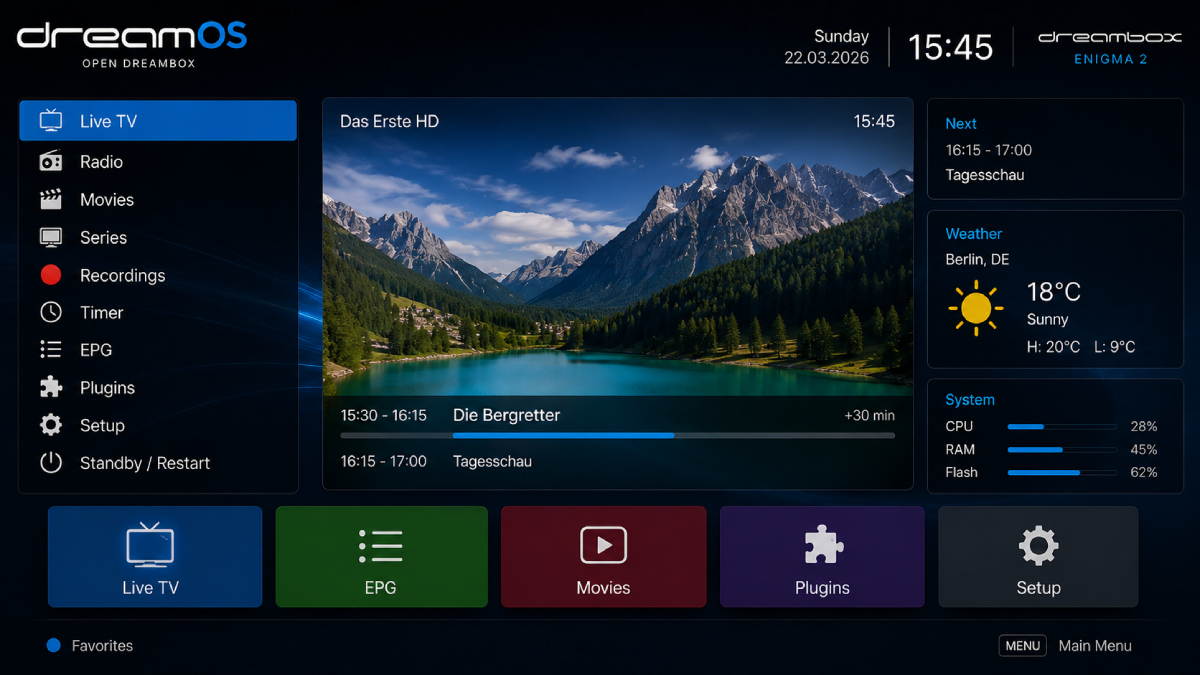
You may encounter both terms while searching for Dreambox firmware.
This is the name commonly used for the Dreambox operating environment.
OpenDreambox refers to the software/build platform behind Dreambox firmware releases.
For example, the official DreamboxUpdate portal currently separates firmware into:
OpenDreambox 2.6
for:
and:
OpenDreambox 2.5
for:
This distinction is important when searching for a DreamOS image.
This is where many articles online become misleading.
The official Dreambox firmware portal currently lists:
| Dreambox Family | OpenDreambox Platform |
|---|---|
| Dreambox TWO UltraHD | OpenDreambox 2.6 |
| Dreambox ONE UltraHD | OpenDreambox 2.6 |
| Dreambox DM920 UltraHD | OpenDreambox 2.5 |
| Dreambox DM900 UltraHD | OpenDreambox 2.5 |
| DM520 / DM525 | OpenDreambox 2.5 |
However, the available firmware files themselves are not necessarily dated 2026.
For example, the official stable DM920 repository currently shows a firmware image dated July 20, 2020, while the stable DM900 repository likewise lists July 20, 2020 as its newest stable image.
For Dreambox ONE, the official stable OpenDreambox 2.6 repository currently lists a 2020 image, while the unstable repository contains builds through February 24, 2022.
For a 2026 article, the accurate statement is: DreamOS remains the Dreambox software platform, but the official firmware repositories do not currently show a new 2026 DreamOS image for these models.
This is much better than labeling an old firmware file as a “2026 release.”
The official Dreambox Download Center currently provides firmware resources for several generations of Dreambox receivers.
These include:
Uses the OpenDreambox 2.6 platform.
Uses the OpenDreambox 2.6 platform.
Uses OpenDreambox 2.5.
Uses OpenDreambox 2.5.
Also listed under the OpenDreambox 2.5 firmware family.
The official Dreambox site also provides manuals and quick guides for these devices.
Dreambox receivers can use different:
Therefore:
DM900 ≠ DM920
and:
Dreambox ONE ≠ Dreambox TWO
Even when two receivers belong to the same brand, their firmware images should not automatically be considered interchangeable.
A Dreambox forum discussion illustrates this clearly: users specifically asked whether a DM900 image could be installed on a DM920, and the discussion explains that the images have different kernels and drivers and should not simply be flashed interchangeably.
The safest place to start is the official Dreambox Download Center.
Dreambox Official Download Center
The official page specifically tells users that current firmware images and update feeds are available through DreamboxUpdate.
Dreambox Firmware Downloads – DreamboxUpdate
From there, select your receiver family.
For example:
Do not choose an image solely because its filename looks similar to your receiver.
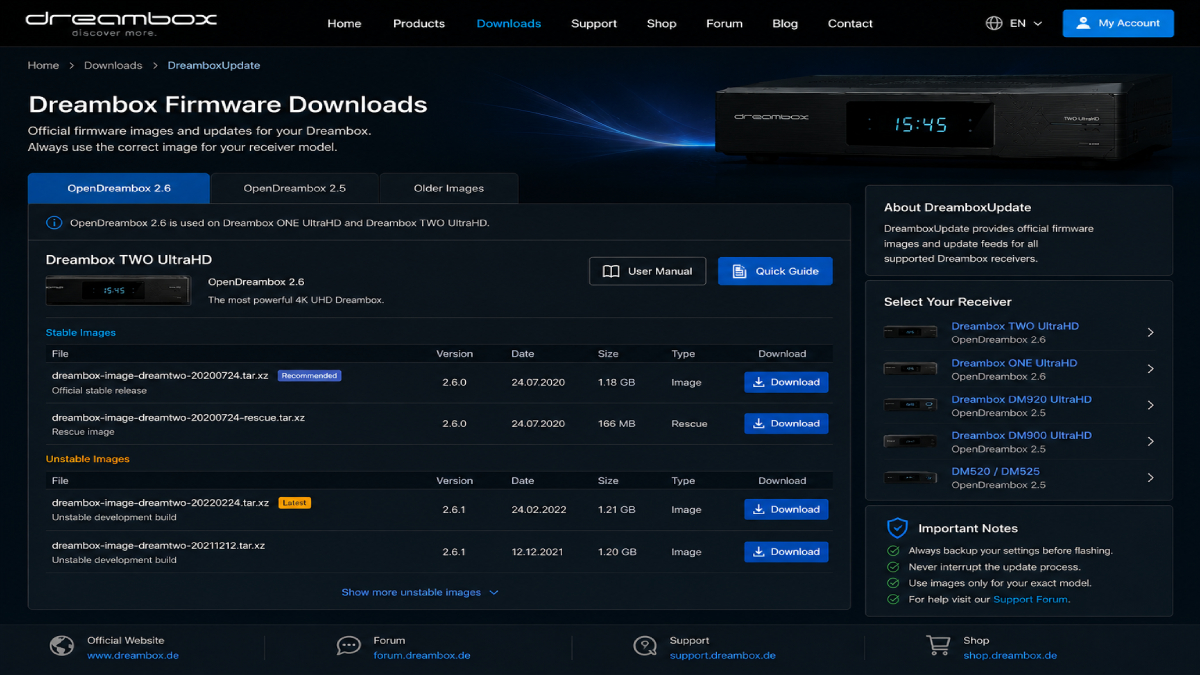
The Dreambox ONE and TWO belong to the newer OpenDreambox 2.6 generation.
The official DreamboxUpdate portal currently provides separate stable and unstable repositories for both models.
For the Dreambox ONE, the stable repository currently contains:
dreambox-image-dreamone-20200724.tar.xz
along with its rescue image.
The unstable repository contains later development builds, with the latest listed build being:
dreambox-image-dreamone-20220224.tar.xz
For the Dreambox TWO, the same OpenDreambox 2.6 architecture is used, with separate firmware repositories.
For most users:
Stable → recommended
The unstable branch is intended for users who specifically need development builds and understand the associated risks.
The DM900 and DM920 belong to the OpenDreambox 2.5 family.
The official DreamboxUpdate portal currently lists both stable and unstable firmware repositories for these receivers.
For the DM920, the latest listed stable image is:
dreambox-image-deb-dm920-20200720.tar.xz
while the unstable repository contains builds through:
dreambox-image-deb-dm920-20211029.tar.xz
The DM900 follows a similar structure, with the stable repository listing a July 2020 image and the unstable repository containing builds through October 2021.
Before downloading, confirm four things.
Identify the exact receiver.
Example:
DM920 UltraHD
not simply:
Dreambox
Check whether your receiver belongs to:
OpenDreambox 2.5
or:
OpenDreambox 2.6
For normal use, choose the stable branch when it meets your needs.
Dreambox repositories can contain both:
These are not the same thing.
The rescue image is associated with the receiver’s recovery/flashing environment and should only be used according to the model-specific installation procedure.
Before changing the firmware, prepare:
Back up:
Dreambox documentation explicitly recommends backing up settings before installing newer software because settings can otherwise be lost.
Do not interrupt power while firmware is being installed.
Verify the exact model.
Know how your specific Dreambox enters its recovery/flashing mode before starting.
The exact flashing procedure depends on the Dreambox model and firmware package, so it is better not to present one universal button sequence.
The general process is:
Confirm the exact model.
Go to DreamboxUpdate and select the correct receiver.
Verify:
Do this before flashing.
Dreambox documentation specifically provides a Backup system settings function under:
Setup → Software management → Backup system settings
Dreambox models can use different recovery and flashing procedures.
Do not use a DM920 flashing guide for a DM900 or Dreambox ONE.
Never:
After DreamOS starts successfully, configure:
Choose the interface language.
Connect the receiver to your network.
Configure HDMI and display resolution.
Configure your satellite tuner.
Set the correct LNB and DiSEqC configuration.
Perform a fresh scan or restore your backed-up channel configuration.
Check the available update feed appropriate for your receiver and installed image.
DreamOS is part of the Enigma2 ecosystem, but its hardware integration is particularly tied to Dreambox receivers.
This is why a DreamOS article fits naturally into your Enigma2 & Tutorials category.
It also complements your existing articles:
The distinction is useful for readers searching for software for a particular receiver.
Users researching DreamOS may also encounter OSCam in the wider Enigma2 ecosystem.
For your website, I recommend keeping this connection informational rather than turning the DreamOS article into a configuration guide for accessing encrypted services.
You can naturally link to your existing:
This is one of the most serious mistakes.
Always verify the exact model before flashing.
A DM900 image should not simply be treated as a DM920 image. Their firmware environments have different hardware requirements.
Check:
If the receiver entered a recovery state, use the appropriate rescue procedure for that model.
If your receiver reports an old DreamOS/OpenDreambox version, don’t assume that a newer generic image exists.
Check the official DreamboxUpdate repository for your exact model.
For example, the official repositories currently show relatively old stable firmware dates for DM900 and DM920.
Plugins can depend on:
Therefore, a plugin designed for one DreamOS environment may not work correctly on another.
DreamOS users also continue to discuss plugin compatibility in the official Dreambox forum.
Before installing:
DreamOS is the software environment used by Dreambox receivers, built around the Enigma2 platform.
No. DreamOS is closely integrated with Dreambox hardware, while OpenATV is a multi-brand Enigma2 image.
Use the official Dreambox Download Center and DreamboxUpdate firmware repositories.
It is the newer software platform used by Dreambox models such as the ONE UltraHD and TWO UltraHD.
It is the software generation used by models such as the DM900 and DM920.
Yes. The Dreambox ONE is listed under OpenDreambox 2.6 firmware.
Yes. The TWO UltraHD is also listed under OpenDreambox 2.6.
Yes. The DM920 is listed under OpenDreambox 2.5 firmware.
Yes. The DM900 is also listed under OpenDreambox 2.5.
The official repositories I checked do not currently show a new 2026 firmware image for the major Dreambox models covered here. The current official portal still lists older firmware files for these generations.
Therefore, users should check the official repository rather than assuming a version number based on the current year.
DreamOS remains an important part of the Enigma2 ecosystem, particularly for users who own Dreambox receivers.
The key difference compared with images such as OpenATV, OpenPLi and OpenHDF is that DreamOS is closely tied to Dreambox hardware and its specific firmware architecture.
The official Dreambox firmware portal currently separates the main generations into:
OpenDreambox 2.6 → Dreambox ONE & TWO
OpenDreambox 2.5 → DM900, DM920 and DM520/DM525

Helping you stay connected with the best IPTV experience. FullPackage IPTV offers premium live TV, sports, movies, and international channels in HD & 4K. Enjoy seamless streaming anytime, anywhere!
© Fullpackage is Proudly Owned by fullpackage.co.uk